Writing Software for Mac That Actually Works at Scale
“Just use any text editor” is advice that survives only until the manuscript becomes difficult to trust. A short story can live almost anywhere. A novel with a large cast, multiple timelines, recurring locations, and several serious revisions needs more than a blank page and a search box.
The first draft hurts because of the writing. The second draft hurts because threads go missing. A character's eye color changes chapters earlier. A scene moves, but its date stays behind. A subtitle returns from an old backup because the folder called “FINAL” wasn't final at all. At that point, writing software for Mac isn't a matter of fonts or dark mode. It's a decision about how you'll keep a long document coherent.
Mac writers also have a commercially meaningful ecosystem to choose from. A 2026 industry estimate put Mac App Store distribution at 48%, with direct and web distribution at 52%, and estimated $1–6 billion in annual pure-Mac third-party software revenue. The same estimate reported 25.6 million Mac shipments in 2025, up 11% year over year. Those figures come from the 2026 Mac apps industry report, and they point to a platform with plenty of serious tools, not a niche afterthought.
Why Your Writing Setup Matters More Than Your Word Count
The popular advice says the tool doesn't matter. The writer matters. That sounds noble, and it's mostly useless once a manuscript has enough moving parts to punish memory.
Word count is only one pressure. Series complexity, revision intensity, and the number of relationships between scenes matter more. A 60,000-word standalone novel with a linear plot may be easier to manage than a shorter book that alternates decades, carries a mystery across three narrators, and plants details that pay off hundreds of pages later.
The document has to remain trustworthy
At professional length, your manuscript becomes a small information system whether you like it or not. The prose is the visible layer. Underneath it sit dates, ages, injuries, possessions, secrets, promises, locations, and changes in what each character knows. A normal text editor stores the sentences. It doesn't understand the relationships those sentences create.
That distinction matters during revision. Moving a scene in Scrivener, Word, Pages, or another editor changes the order of text, but it doesn't necessarily tell you that the move creates an impossible travel day or gives a character knowledge before the scene where they learn it. You can search for a name. You can't reliably search for every state that name ought to be in.
A long manuscript doesn't fail because the writer lacks a character sheet. It fails because the sheet sits untouched while the manuscript changes.
A static profile is useful during development. It can hold a voice note, a physical description, or a piece of backstory. But it won't automatically update when a character loses a ring, changes allegiance, learns a secret, or stops living at a particular address. That's why the software choice should follow the failure mode.
A distraction-free editor reduces friction while drafting. A manuscript manager handles structure. A cloud editor handles collaboration and delivery. A tracking layer checks the facts that prose tools don't model. The scalable setup usually combines categories instead of demanding that one application pretend to do everything.
The Four Categories of Mac Writing Software
Choose the category before you choose the brand. Most expensive workflow mistakes begin when a writer adopts a tool because it feels pleasant in the first week, then tries to force it through a project it was never designed to hold.
Distraction-free editors
iA Writer, Ulysses, and Bear are excellent when the work is primarily prose and the structure stays relatively simple. They're fast, quiet, and less interested in turning your novel into a project-management dashboard. For a debut novel with one main narrative, a short nonfiction book, or a collection of essays, that restraint can be a feature.
They become awkward when scenes need to move independently, research must sit beside the draft, or several versions of an ending need to coexist. Ulysses suits writers who value a polished, synced environment. iA Writer suits writers who want the interface out of the way. Bear is useful for connected notes, but it isn't a substitute for a manuscript architecture.
Manuscript managers
Scrivener, Storyist, and Plottr earn their keep when the project has scenes, research, multiple acts, and out-of-order assembly. Scrivener's import and export documentation covers Word, plain text, and RTF on import, with compilation to formats including Word, PDF, plain text, Final Draft, and Markdown variants, as shown in its import and export guidance.
That format neutrality matters. A manuscript manager should help you arrange the work without making the final book dependent on its internal file format. Scrivener is the obvious fit for structurally heavy fiction and a trilogy with recurring locations. Plottr is stronger as a planning surface than as a complete drafting environment. Storyist sits between the two, offering manuscript structure without requiring every writer to adopt the same project philosophy.
For a useful comparison beyond novel writing, the top editorial workflow software overview gives a broader view of how structured editorial systems handle assignments, review, and production.
Screenwriting applications
Final Draft, Highland, and Slugline solve a narrower problem, and that's precisely why they work. Screenwriting has format constraints, page conventions, and expectations around readability. If the document is going to a producer, reader, or production team, format-locked software beats a general writing application with a screenplay template bolted on.
Don't use Final Draft to manage a sprawling novel because you like its scene navigation. Don't use Scrivener for a script if the production workflow expects a standard screenwriting file. The constraint is part of the job.
Cloud editors
Google Docs, Pages, and Word for Mac are practical when other people need to comment, edit, or receive a familiar file. They're also the safest choice when a publisher, agent, lawyer, or collaborator has already established a delivery format.
The trap is mixing categories without deciding which application owns the manuscript. Drafting in Ulysses, revising in Word, collecting notes in Google Docs, and maintaining a Scrivener outline creates version sprawl unless one file is clearly authoritative. For a nonfiction book with interviews, Word or Google Docs may win because collaboration dominates. For a private fiction draft, a local manuscript manager plus a separate tracking system is usually more durable.
For a broader look at options and trade-offs, see writing software for Mac. The important choice isn't which application has the longest feature page. It's whether the category matches the way the manuscript breaks.
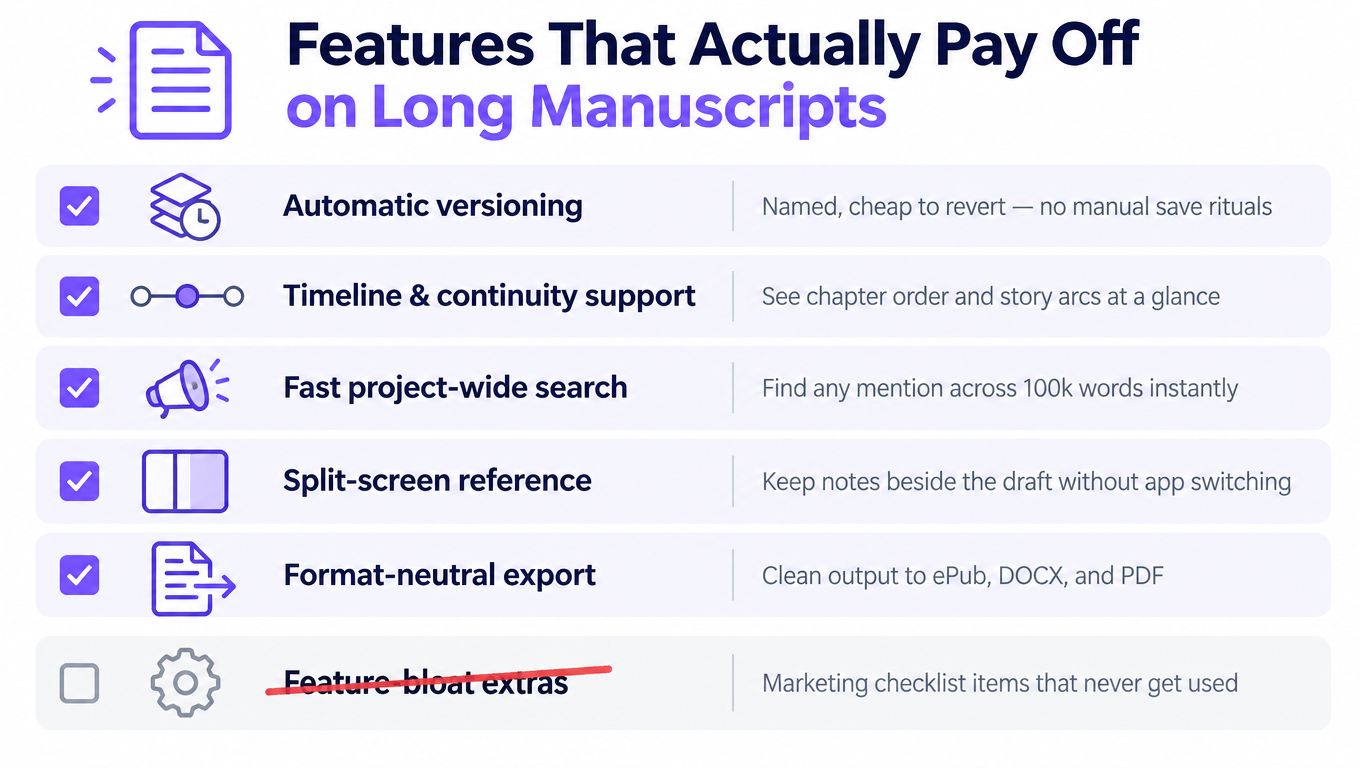
Features That Actually Pay Off on Long Manuscripts
Long manuscripts expose fake features quickly. A tool can offer elaborate dashboards, templates, badges, and decorative corkboards, yet still fail at the unglamorous jobs that protect a revision.
Versioning must be reversible
Automatic versioning matters because manual save rituals collapse under deadline pressure. A useful system creates snapshots without asking you to remember, lets you name meaningful milestones, and makes restoration cheap. “Final,” “final revised,” and “final revised new” aren't version control. They're evidence of panic.
The primary editor usually provides some structure, but backups and version history must remain independent. If a sync service mirrors a mistake instantly, it isn't a complete recovery plan.
Continuity needs structure
A timeline should treat dates, ages, locations, and scene order as data rather than decorative notes. Search helps you find a phrase. It doesn't prove that a character can get from one city to another between consecutive scenes or that a birthday remains possible after a time jump.
The manuscript manager supplies scene identity and order. A tracking layer supplies the relationships. That separation is valuable because it keeps continuity checks from becoming another pile of prose notes.
Imports must survive the round trip
A writing application that imports beautifully but exports badly is a trap. Test DOCX, RTF, PDF, and plain text with a real chapter, not a toy file. Look for broken italics, altered quotation marks, damaged footnotes, missing comments, and chapter headings that no longer behave as headings.
Collaboration needs a permission model, too. Comment-only access is not the same as edit access. A beta reader should be able to annotate a passage without changing the sentence you spent an afternoon tuning.
Privacy belongs in the architecture
Writers handle unreleased fiction, client material, legal content, financial information, and health-related notes. Current Mac writing coverage often focuses on connected assistants and cloud services, while local-first writing tools represent a smaller category that processes material on the device and avoids internet transmission and metered API costs.
That isn't a moral argument against cloud software. It's a workflow requirement. Decide where the manuscript lives, what leaves the Mac, and whether the vendor can access or reuse the text before you upload a book under contract.
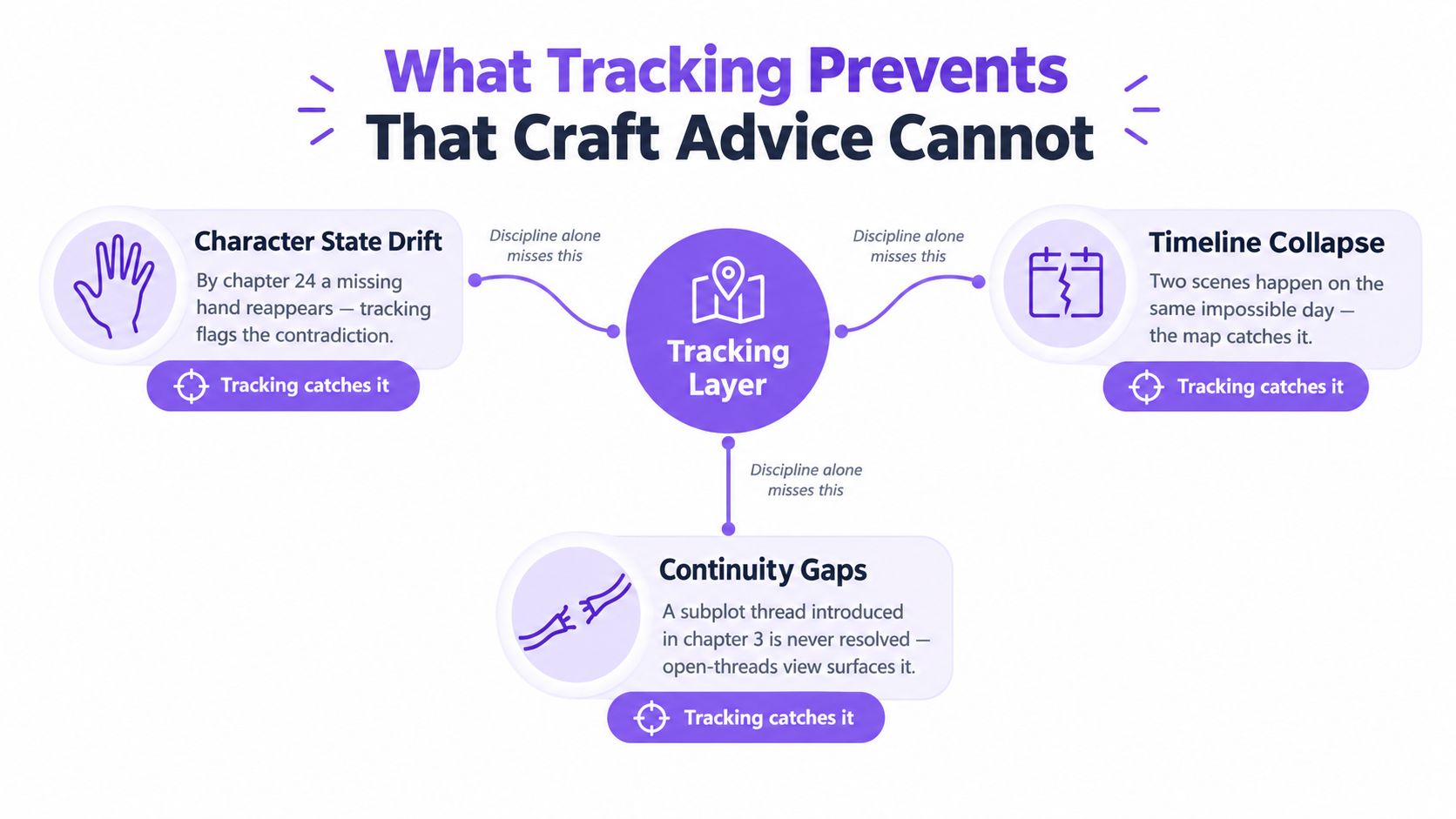
What Tracking Prevents That Craft Advice Cannot
A character sheet can tell you that Mara has one hand. It can't reliably tell you that the hand is still missing in chapter 24 after three revisions, a reordered flashback, and an imported scene.
That failure happens because writers track intentions separately from execution. The profile says one thing. The manuscript says another. During a close reread, your brain smooths over familiar material and supplies the fact it expects to see. The sentence passes because you know the character too well.
Character state drift
A missing hand reappears during a tense scene. A scar moves from the left cheek to the right. A dead parent gives advice in a present-day exchange that wasn't marked as memory. These aren't craft failures. They're state failures, and discipline alone doesn't guarantee that you'll catch them.
A tracking layer can attach the physical fact to the character and compare mentions across scenes. It doesn't rewrite the scene or decide whether the contradiction is intentional. It surfaces the conflict while you still know why the passage changed.
Timeline collapse
A story can announce a calendar and then violate it. A character attends a funeral before the journey that gets them there. Two scenes occupy the same day when the plot requires a week. An anniversary falls on the wrong date after a revision changes the opening.
A spreadsheet helps only when you remember to update it and consult it. A structured timeline tied to scene IDs can flag impossible sequences as the manuscript evolves. The point isn't to turn fiction into accounting. The point is to stop accidental chronology from impersonating deliberate design.
Version confusion
The most dangerous folder is the one containing “FINAL,” “FINAL2,” and “really final.” One copy has the repaired midpoint. Another has the better ending. A third contains comments from an editor that never made it into the current file.
Automatic snapshots and named revisions make recovery ordinary instead of heroic. You need to know which manuscript is authoritative, when a change happened, and how to return to an earlier state without merging fragments by hand.
Character development documents describe what you intend. Character tracking records what the manuscript currently contains.
A tracking system works as an operational layer. It indexes characters, events, locations, and recurring objects, then gives you a queryable view of what the draft asserts. Craft knowledge remains essential. It stops carrying the entire burden of continuity in one tired human memory.
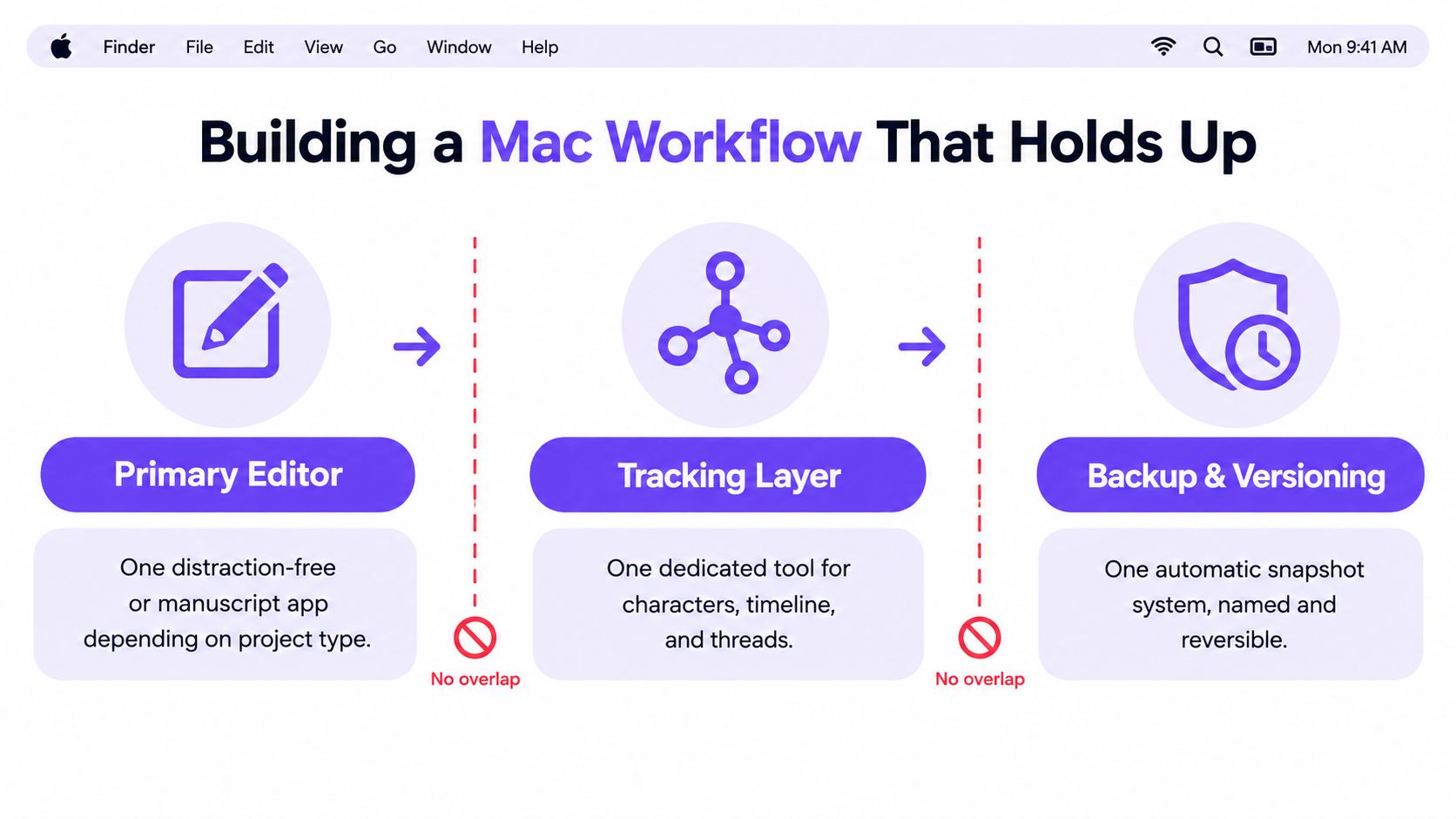
The workflow looks simple when the roles stay separate. The editor holds prose. The tracker holds facts and relationships. The backup system holds recoverable history.
Building a Mac Workflow That Holds Up
Use three layers and assign each one job. Primary editor, tracking layer, backup and versioning. If two applications claim ownership of the same information, the workflow will eventually produce conflicting truths.
Put the prose in one primary editor
Choose by project, not by loyalty. iA Writer works well for short nonfiction where the draft is mostly linear. Ulysses suits long-form writers who want a clean environment with syncing. Scrivener remains the sensible choice for structural fiction with a binder, research folders, scene cards, and out-of-order assembly.
Keep the draft text in that application. Don't maintain a second “clean master” in Word unless delivery requires it. Export a copy when needed, but preserve one source of truth.
Put continuity beside the draft
The tracking layer should record character states, timeline entries, locations, and recurring objects keyed to scene identifiers. It shouldn't become a second manuscript. If you duplicate every paragraph as a note, you've built an expensive filing cabinet.
A local-first tool such as Novelium can sit in this layer, extracting character details and tracking continuity across a manuscript while leaving the prose in the editor. Its value depends on the boundary. The tracker should expose contradictions, not flatten your voice into a database.
Make recovery boring
Time Machine provides local history. Keep an offsite copy through a service such as Backblaze or Arq, and use filenames that include the date and revision number rather than “final.” Backups protect against loss. Versioning protects against your own decisions.
For writers who want deeper history, Git can store chapter-boundary exports, either through a writing-focused wrapper such as Novelibre or through manual commits of DOCX files. You don't need to become a software engineer. You do need a repeatable habit that lets you answer, “Which version contained the fixed midpoint?”
A practical workflow also accounts for distribution. Apple requires hardened runtime and notarization for macOS apps distributed outside the Mac App Store, and its notarization process runs after an Xcode archive is created, Developer ID is selected, and the app is uploaded for processing. Apple also states that a notarized Mac app must be code signed with a Developer ID certificate in its notarization troubleshooting guidance. For writers, the lesson is simple: a local application still needs a trustworthy installation and update path.
When you're building a nonfiction project with a central argument, a practical guide to academic thesis statement help can be useful for the planning layer. It doesn't replace the editor. It belongs with the project notes, while the manuscript remains in the primary writing environment.
Migrating From Word, Google Docs, or Scrivener
Migration is where attractive software demos meet actual manuscripts. Every format carries baggage, and the silent failures are worse than the obvious ones.
| Source | Export format | Known loss | Cleanup required |
|---|---|---|---|
| Word | DOCX | Tracked changes and comments may not survive | Resolve or export review material separately, then inspect styles |
| Google Docs | DOCX or ODT | Tables, footnotes, and some formatting may be stripped | Rebuild damaged elements and verify paragraph structure |
| Scrivener | DOCX or plain text | Binder structure may disappear in a single-file export | Recreate scene organization or import into a tool that reads Scrivener XML |
Word DOCX usually travels cleanly into Scrivener, Ulysses, and Pages, but tracked changes and comments need separate handling. Resolve them before migration or preserve a review copy as PDF so you don't confuse editorial history with the manuscript itself.
Google Docs requires a deliberate download. Export to DOCX or ODT, then inspect tables, footnotes, smart quotes, and heading styles. There isn't a magic direct sync that preserves every detail. If the book depends on complex tables or carefully numbered notes, expect reconstruction.
Scrivener offers the smoothest route when the project already lives in its bundle. Compile to DOCX or plain text for a single-editor workflow, or use a destination that can read the relevant Scrivener XML structure. The trade-off is structural. A clean document export gives you portability, but it may flatten the binder that made the project manageable.
Treat the first three chapters as a migration test, not a ceremonial sample.
Do a side-by-side proofread after import. Check character encoding, curly quotation marks, italics, footnote numbering, scene breaks, and chapter headings. For a full-length manuscript, plan a weekend for a clean migration, not an afternoon. A comparison of Novelium and Scrivener is useful when the decision is not just about export versus import, but about which layer should own the project going forward.
Where Manuscript Intelligence Fits In
Manuscript intelligence belongs between the editor and the backup system. It reads the draft on disk, indexes characters, locations, timeline markers, recurring objects, and information states, then surfaces continuity drift that rereading alone routinely misses.
That makes it different from a development document. A development document records what you planned. A manuscript-intelligence layer checks what the manuscript now says. It should be passive about style and active about facts, like a spell-checker for continuity rather than a co-writer with opinions about your sentences.
Local processing changes the privacy decision
The privacy case is concrete. Sensitive drafts shouldn't leave the Mac merely because a convenience feature is enabled. Apple's macOS development resources describe Xcode as the central toolchain, with code completion, simulators, profiling, and debugging tools that help developers measure responsiveness, memory behavior, and startup bottlenecks in one environment, as explained in Apple's macOS development resources. The same principle applies to writing tools. A local application can keep processing and storage under the writer's control.
Sandboxing still matters. macOS apps that access documents outside their container need file entitlements, and Apple documents read-only and read/write access for user-selected files through App Sandbox file access. Persistent access commonly uses security-scoped bookmarks and the relevant access methods, so a serious Mac writing tool must respect the operating system's permission model rather than treating the filesystem as an open cupboard.
For a six-book series, the continuity burden spans a cast and a history that no single reread can hold comfortably. A local index can flag an eye-color change, an anniversary that no longer matches the calendar, or a subplot introduced early and abandoned later. It doesn't decide whether the change is a mistake. It makes the decision visible.
This is the missing tier in many Mac stacks. Writers compensate with spreadsheets, sticky notes, and documents named after emotions. A tracker turns those scattered assertions into a system you can query while the manuscript is still moving. For a closer look at this category, see AI writing software for novelists, while keeping the privacy and local-processing distinction clear.
What to Skip and What to Spend On
Skip subscription word counters, assistants bolted onto editors you didn't choose, and proprietary clouds that make manuscript recovery dependent on a vendor's account. Skip plugin ecosystems that promise to do everything, then become fragile as the project grows.
Spend on a dependable primary editor, versioned backups with an offline copy, and a local manuscript-intelligence layer that stays focused on continuity. Series writers get the most value from structured tracking because a single contradiction can survive several rounds of ordinary proofreading. Standalone writers may need only a clean editor and disciplined recovery system.
The honest summary is less glamorous. Most writing-software spending fails because it duplicates capabilities already in the stack or sells beginner features to writers who need operational control. Buy the layer that protects the failure you've already experienced.
Novelium's Character Tracker and World Codex automatically extract and track character details across manuscripts, including states, relationships, events, and continuity signals. Visit Novelium to see how a local-first tracking layer can sit beside your Mac writing software without taking over the prose.