The Definitive Guide to KDP Book Sizes for Authors
Picking the right size for your KDP book isn't some tiny detail you figure out at the last minute. It's one of the first strategic calls you have to make, and it shapes your book's place in the market, your profit margins, and how readers see it from day one.
For most fiction, the heavy hitters are 5.5" x 8.5" and 6" x 9". These are your standard trade paperback sizes, and they immediately signal a professional, traditionally published quality to a potential buyer. Get this wrong out of the gate, and you could be looking at a painful reformatting process or, worse, a book that just feels... off for its genre.
Why Your KDP Trim Size Is a Strategic Decision
Deciding on your book's physical dimensions goes way beyond just how it looks. It's a foundational choice that has a direct line to your production costs, how much you earn in royalties, and how your book literally stacks up against the competition on a shelf.
Your trim size sends instant, subconscious messages about genre, quality, and even price. A massive fantasy epic feels right at home in a beefy 6" x 9" format. On the other hand, a lean, fast-paced thriller fits perfectly in a tighter 5.25" x 8" package.
Common KDP Trim Sizes by Fiction Genre
To give you a starting point, here’s a quick-reference guide matching popular KDP paperback sizes with the fiction genres they suit best. Think of these as the industry standards—the sizes readers are already trained to look for.
| Trim Size (Inches) | Best-Fit Fiction Genres | Typical Word Count Range |
|---|---|---|
| 5" x 8" | Novellas, Thrillers, Young Adult | 40,000 - 65,000 words |
| 5.25" x 8" | Thrillers, Mysteries, Contemporary Fiction | 50,000 - 80,000 words |
| 5.5" x 8.5" | Romance, Literary Fiction, Mainstream Fiction, Memoirs | 60,000 - 90,000 words |
| 6" x 9" | Sci-Fi, Fantasy, Historical Fiction, Non-Fiction | 80,000 - 120,000+ words |
Sticking to these conventions helps your book blend in seamlessly with others in its category, which is exactly what you want. It removes any friction and tells the reader you know what you’re doing.
Aligning with Reader Expectations
Readers have deep, almost unconscious expectations for how a book in their favorite genre should look and feel in their hands. A romance novel printed in an oversized 8.5" x 11" format would feel completely bizarre, just like a dense historical fiction novel squeezed into a tiny mass-market size would feel cramped and amateurish.
When you select a standard trim size for your category, you're meeting those expectations and knocking down a potential barrier to someone buying your book. It communicates that you get the market and you’ve made a product that belongs on the same shelf as the big names. For authors juggling complex stories, it's vital that the physical container for your narrative feels as expertly crafted as the words inside. If you want a peek at how we help authors tame that kind of manuscript complexity, you can learn more about Novelium's manuscript intelligence platform.
Impact on Page Count and Profitability
This is where the rubber really meets the road. Your choice of trim size has a direct and pretty significant impact on your final page count. A larger page holds more words, which means your manuscript will take up fewer pages overall.
Why does that matter? Because Amazon KDP calculates printing costs with a fixed charge plus a per-page fee. A lower page count directly translates to a lower print cost.
This means you can actually increase your royalty on every single copy sold without touching your list price. It's one of the biggest levers you can pull to manage your finances before your book is even available. We'll dig into the exact math later, but for now, just know this isn't a design choice—it's a business decision.
Decoding Paperback Trim Sizes and Genre Conventions
Picking the right paperback trim size feels like a small detail, but it’s a huge strategic decision. It’s what signals your book’s genre to a browsing reader and has a very real impact on your printing costs. Ever since Amazon launched Kindle Direct Publishing (KDP) back in 2007, getting these physical details right has become mission-critical. And with Amazon pushing out around 300 million print books a year, you can bet that the physical format still reigns supreme.
Each standard KDP book size sends a different message. It hints at the genre, frames the reader's perception of value, and literally changes how they hold your story in their hands. The goal is to make sure the container perfectly fits the content inside.
The Compact Powerhouses: 5" x 8" and 5.25" x 8"
Think of the 5" x 8" and 5.25" x 8" sizes as the lean, efficient sprinters of the KDP world. They’re fantastic for novellas and shorter novels—anything clocking in under 70,000 words. These sizes work especially well for genres that move fast, like thrillers or a lot of young adult fiction.
Their smaller size makes them easy to toss in a bag, giving them a "quick read" vibe that can be a real psychological draw for readers. The trade-off? A smaller page means more pages for the same word count, which directly bumps up your printing cost. You have to weigh that slick, portable feel against the hit to your royalties.
The Industry Standard: 5.5" x 8.5"
For a huge number of fiction genres, the 5.5" x 8.5" is the undisputed sweet spot. It just feels right. This trim size is probably the most professional and versatile option you can choose, striking a perfect balance between feeling substantial in a reader’s hands without being clunky.
It’s the go-to for contemporary romance, literary fiction, and mainstream thrillers. It has that classic trade paperback look that readers know and trust. For manuscripts in the 70,000 to 90,000-word ballpark, this size often nails the page count, keeping things readable for the customer and profitable for you.
Choosing a trim size is a branding decision. A 5.5" x 8.5" book on a shelf next to a 6" x 9" epic fantasy communicates different promises to the reader before they even read the back cover. Your book's physical dimensions are part of its marketing.
This decision tree helps visualize how your genre and word count should steer you toward the right KDP book size.
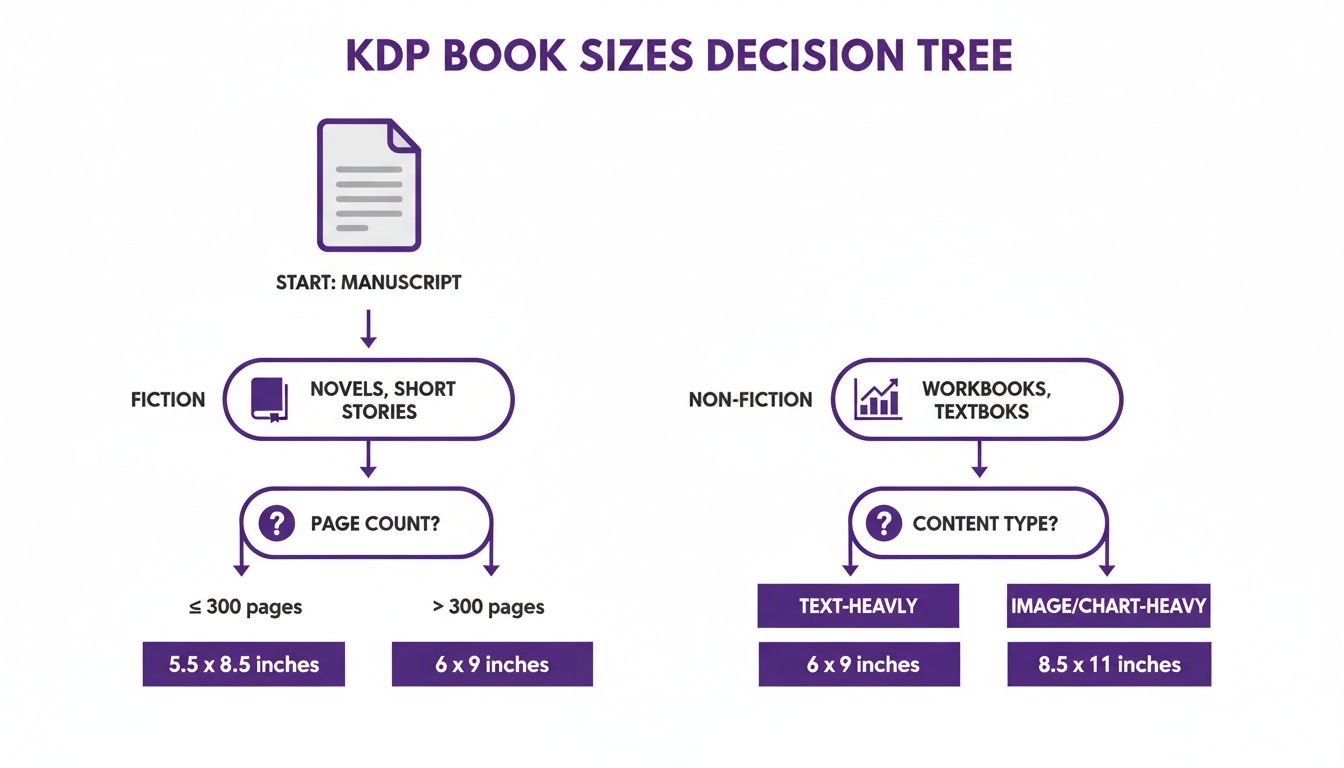
As you can see, for fiction authors it really boils down to genre expectations and word count. Nailing this alignment is key to fitting in on the bookshelf.
The Epic Format: 6" x 9"
When your story is big and you need a book with a commanding presence on the shelf, the 6" x 9" trim size is your champion. This is the standard for longer, more immersive works that need some breathing room.
This format is the natural home for sprawling fantasy sagas, dense historical fiction, and complex science fiction—we're talking manuscripts that are 90,000 words and up. The larger page holds more text, which is a lifesaver for keeping the page count (and your printing costs) from getting out of hand on a massive book. Choosing 6" x 9" is a signal to your readers: get comfortable, you're in for a deep and substantial ride.
Thinking about moving into hardcovers on KDP? It’s more than just a format change—it’s a strategic play. A hardcover signals a premium product. It's the perfect way to create a special edition, a collector's item for your biggest fans, or even just a high-priced anchor that makes your paperback look like an absolute steal.
Amazon offers five hardcover trim sizes, and they all lean toward the larger end of the spectrum. This isn't an accident; it gives your premium edition a noticeable heft and presence. These are your only options, though, so you'll want to make sure your vision for the book fits within one of these specific dimensions.
The Hardcover KDP Book Sizes
Here are the five trim sizes you can print as a KDP hardcover. As you can see, they skew bigger, which helps reinforce that premium feel.
- 5.5" x 8.5"
- 6" x 9"
- 6.14" x 9.21"
- 7" x 10"
- 8.25" x 11"
Unlike the dozen or so choices you have with paperbacks, the hardcover selection is much more curated. For most fiction, the 6" x 9" and 6.14" x 9.21" are fantastic choices. The larger formats, on the other hand, are better suited for projects heavy on art or photography, or for certain non-fiction books that need more breathing room.
Case Laminate vs Dust Jacket
This is a big one: KDP currently offers only one type of hardcover, and it's called case laminate. Think of a textbook. The artwork is printed directly onto the hard cover itself. There is no separate, removable dust jacket option available through KDP’s print-on-demand service.
This is a critical distinction to make early on. If you've been dreaming of a classic dust jacket with those foldable interior flaps, you’ll need to look at another printing service like IngramSpark. For KDP, your entire cover design—front, back, and spine—is created as a single, wraparound image that gets permanently glued to the cover boards.
The Financials of Hardcover Production
Get ready for a significant jump in your print costs. Hardcovers are simply more expensive to make, which means you'll have to set a much higher list price to see a decent royalty. For perspective, a 300-page, 6" x 9" paperback might cost around $4.45 to print. The hardcover version of that same book could easily run you $8.00 or more.
This higher cost forces you to think strategically about pricing. You're not just selling a book anymore; you're selling a premium artifact. You need to price it accordingly, both to protect your margin and to position it in the market as the durable, high-value version of your work.
Your design files are going to need a complete overhaul, too. The spine will be wider to account for the thicker cover boards, and the overall dimensions for your cover file will be completely different from your paperback's. This isn't a simple file swap; it's a whole separate design project. Go into your hardcover edition with a clear head about these added costs and design requirements from the start.
Understanding Margins, Bleed, and Gutter Settings
Technical precision isn't just for editors. When it comes to a professionally printed book, getting your margins, bleed, and gutter settings right is absolutely non-negotiable. These numbers dictate readability, prevent ugly printing errors, and—most importantly—ensure your precious words don’t get sliced right off the page during production.
Think of these settings as the foundational blueprint for your book's interior. If you mess them up, the final product will look amateurish, no matter how brilliant the writing is. Amazon's printers are incredibly precise, but they aren't magic; they can only work with the files you give them.
The Role of Margins and Gutter
Margins are the blank spaces around your text—top, bottom, and the outside edge of the page. Simple enough. But the gutter is the real hero here. It's the critical blank space on the inside edge of the page, right where the book is bound together.
If the gutter is too small, your readers will have to practically crack the spine just to see the words closest to the binding. It's a frustrating experience and a dead giveaway of a self-published book that skipped the details.
KDP’s margin requirements are directly tied to how many pages are in your book. It makes sense when you think about it: a thicker book has a more pronounced curve near the spine, so it needs a wider gutter. Getting this wrong is one of the most common reasons KDP rejects a manuscript file.
Here are the minimums you absolutely must follow:
- 24 to 150 pages: Inside (gutter) margin of 0.375" (9.6 mm)
- 151 to 300 pages: Inside (gutter) margin of 0.5" (12.7 mm)
- 301 to 500 pages: Inside (gutter) margin of 0.625" (15.9 mm)
- 501 to 700 pages: Inside (gutter) margin of 0.75" (19.1 mm)
- 701+ pages: Inside (gutter) margin of 0.875" (22.3 mm)
For your outside, top, and bottom margins, the minimum is 0.25" (6.4 mm). Frankly, that’s a bit cramped. For better aesthetics and a much more pleasant reading experience, I always recommend aiming for 0.5" or even more.
What Is Bleed and When Do You Need It?
Bleed is a classic printing term. It refers to any image, background color, or design element that needs to extend all the way to the absolute edge of a finished page. To make this happen, you have to design your file to be slightly larger than your final trim size.
If your book's interior is just text from margin to margin, you're in the clear. You’ll select "No Bleed" when you upload your manuscript to KDP.
But, and this is a big but, if you have anything that touches the page edge—chapter heading graphics, full-page illustrations, fancy background textures—you must select "Bleed." If you don't, KDP will either reject your file or print it with a thin, unprofessional-looking white border around your images.
When you design with bleed, KDP requires you to add 0.125 inches to the top, bottom, and outside edges of your page. So for a standard 6" x 9" trim size, your actual PDF manuscript file needs to be sized to 6.125" x 9.25". That extra bit gets trimmed off by the printer, ensuring the color goes cleanly to the very edge without any weird white slivers.
Calculating Your KDP Spine Width Accurately
Getting your spine width right isn’t just a nice-to-have; it's the absolute cornerstone of a professional-looking book cover. If you miscalculate, you're looking at a rejected file from KDP, text that wraps awkwardly around the edges, or a finished book that just screams "amateur."
It sounds intimidating, but it’s really just simple math. KDP gives us the exact formulas, and they boil down to two things: your final page count and the color of the paper you choose. That’s because the paper thickness is slightly different for each type.
KDP Spine Calculation Formulas
Here are the formulas you’ll need to plug into your calculator:
- For White Paper: Page count x 0.002252 inches (or 0.0572 mm)
- For Cream Paper: Page count x 0.0025 inches (or 0.0635 mm)
- For Hardcover: This is the big one people miss. You need to add 0.0625" (1.6 mm) to your paperback calculation to account for the hinge area.
Let’s run through a quick example. Say you've written a 350-page paperback and you’re going with cream paper for that classic, bookish feel.
The calculation is straightforward: 350 pages x 0.0025" = 0.875 inches.
Your spine needs to be exactly 0.875 inches wide. Even a hair off can cause your spine text to creep onto the front or back cover, which is a dead giveaway of a DIY job.
The Easiest Way to Get It Right
Doing the math yourself is a great way to understand what's happening under the hood, but honestly, there's a much easier, foolproof way to do this.
Just use KDP's own Cover Calculator & Template Generator.
You punch in your trim size, page count, and paper type, and it spits out a perfect template (in PNG, PDF, and ZIP formats) with the exact dimensions your cover designer needs. There’s zero reason to guess.
Plenty of authors use dedicated tools to manage their writing—as you can see in our breakdown of Novelium vs Scrivener—but leaning on KDP's own tools for the final production steps is just smart. It guarantees your cover files are built to spec right from the start.
KDP Cover and Interior File Requirements
Getting your book uploaded to KDP flawlessly comes down to a handful of technical specs you just can't ignore. Think of this as your pre-flight check. Nail these file requirements, and your book sails through the system. Get them wrong, and you’re grounded by frustrating—and entirely avoidable—rejection emails.
These details aren't just about appeasing KDP's automated checks; they directly impact your book's professionalism, its print quality, and, ultimately, your bottom line. KDP exists within a massive self-publishing economy, and every choice, right down to trim size, plays into that scale. Between 2007 and 2018, the number of self-published titles exploded, and today, Amazon releases over 1.4 million of them every single year. At that volume, even tiny differences in formatting add up to millions of dollars in print costs across the entire catalog. KDP’s 2025 royalty adjustments only tightened the margins where page count and trim size hit your profit per copy. You can get a better sense of the scale of KDP's operations on wordsrated.com.
Your Interior Manuscript File
First thing's first: forget about uploading a Word doc or your raw Scrivener project. KDP needs a single, print-ready PDF for your interior. To be specific, they demand a PDF/X-1a:2001 compliant file. It sounds technical, but most professional layout software and even modern word processors can export to this format. The critical part is that it flattens transparencies and embeds all your fonts, which is mandatory.
- File Type: A print-ready PDF. No exceptions.
- Font Embedding: All the fonts you used must be fully embedded in the PDF. This is crucial. It stops the printer from swapping out your carefully chosen typeface for a default font like Courier, which would instantly ruin your book's look.
- Image Resolution: Any images inside your book—a map, a chapter graphic, an author photo—have to be at least 300 DPI (dots per inch). Anything less will look blurry or pixelated in print, screaming "amateur" from the page.
Your Book Cover File
When it comes to your cover, you have two options: use KDP’s basic Cover Creator tool or upload a professional, print-ready file. For any serious novelist, this isn't really a choice. You need a custom cover.
KDP’s Cover Creator is fine for a quick test run, but it’s not a tool for building a career. Its templates are limited and instantly recognizable as "self-published." Always, always invest in a professional cover designer who knows how to deliver a print-ready file.
Your designer should provide a single, wraparound PDF that includes the front cover, back cover, and a spine calculated to the exact width of your book. This file has its own strict set of rules.
- File Type: The standard is a single, flattened PDF.
- Resolution: Just like the interior, the cover has to be 300 DPI.
- Color Profile: The file must be in CMYK (Cyan, Magenta, Yellow, Black), the color model for professional printing. If you submit a file in RGB (the color model for screens), you'll get some nasty, unexpected color shifts when the book is actually printed.
Getting these technical details right is just as important as getting your story right. The same meticulous attention you apply to tracking characters and plotlines needs to be applied to these final production files. If you're looking for tools to help manage that manuscript complexity from the start, you might find our guide on choosing the right novel writing software helpful.
Common Questions About KDP Book Sizes
Dipping your toes into the technical side of KDP always brings up a few crucial questions. Getting these right from the get-go can save you from a world of formatting headaches and make sure your book looks and feels professional.
What Is the Most Popular KDP Book Size for Fiction Novels?
For most fiction, the industry workhorses are 5.5" x 8.5" and 6" x 9". You really can’t go wrong with either, but the choice often comes down to word count.
A 6" x 9" trim is the standard for longer books—think sprawling fantasy, science fiction, or historical epics that clock in over 90,000 words. It gives the text plenty of room to breathe on the page, which helps keep your final page count from getting out of hand (and keeps print costs down).
The 5.5" x 8.5" size is a fantastic, versatile choice for genres like literary fiction, thrillers, and contemporary romance. It feels substantial in the reader's hands without being clunky, hitting that sweet spot for manuscripts in the 70,000 to 90,000-word range. While smaller sizes like 5" x 8" do exist, they tend to inflate your page count and shrink your royalty, making them a better fit for novellas.
Can I Change My Book Trim Size After Publication?
Nope. Once a book is published with an ISBN, its trim size is set in stone. That ISBN is tied directly to that specific physical edition of the book, and its dimensions are a permanent part of that record.
If you absolutely have to change the size, there's only one way to do it: you have to unpublish the original version and start completely over. That means creating a brand-new book project on your KDP dashboard, which will get a new KDP ISBN (or you can bring your own).
This is a huge point a lot of authors miss: a new edition means you’re starting from absolute zero. None of the reviews, the sales rank, or the "also-boughts" from the old version will carry over. In Amazon's catalog, it's a completely separate product.
Does KDP Book Size Affect Printing Costs and Royalties?
Yes, absolutely. Your trim size is one of the biggest factors in what your book costs to print, because the whole calculation hinges on your final page count.
A larger trim size, like 6" x 9", can fit more words on a page than a smaller one like 5.25" x 8". For the exact same manuscript, this means a lower total page count.
KDP figures out your printing cost with a fixed charge plus a per-page fee. So, a lower page count directly leads to a lower print cost for every copy sold. Since your royalty is calculated as (List Price x 60%) - Print Cost, choosing the right trim size can literally increase your profit on every sale without you ever touching your list price. It’s a pure business decision.
Are KDP Trim Sizes the Same Internationally?
For the most part, yes. KDP’s standard trim sizes in inches are used across its big marketplaces like the US and UK. But in some places, especially in Europe, they also use A-series paper sizes (like A5), which are based on millimeters.
KDP handles the conversion behind the scenes, so you don't need to create separate files for each country. Just be aware that a book ordered in another country might be printed at a facility with slightly different standard dimensions. The difference is usually tiny and just part of how KDP's global print-on-demand network functions.
Formatting mistakes can sink a book, but so can continuity errors and plot holes. While you’re making sure your book’s physical presentation is perfect, don’t forget to check that its internal logic is just as solid. Novelium is a manuscript intelligence platform that acts as your personal continuity editor, automatically tracking characters, timelines, and world details to catch inconsistencies before your readers do. Discover how Novelium can help you publish with confidence at novelium.so.